

What Is Zero Trust Security and Does Your Organization Actually Need It?

- Cybersecurity
- July 8, 2026
“Zero Trust” is one of those cybersecurity terms that gets used often, but not always clearly.
You may have heard it in a webinar, from a cyber insurance provider, or during a conversation about remote work. It can sound like an enterprise-level concept meant only for large companies with big IT departments. But the idea behind Zero Trust is simple: do not automatically trust anyone or anything just because they are inside your network.
For small businesses and nonprofits, that matters more than ever. Employees work remotely, volunteers use personal devices, cloud platforms hold sensitive files, and vendors access internal systems. A single password can open the door to email, payroll, donor records, financial documents, and client data.
Zero Trust security is a way to reduce that risk by verifying access every time.
Zero Trust Security Starts With One Simple Idea
Zero Trust security is a cybersecurity approach built around continuous verification. Instead of assuming that users, devices, or applications are safe simply because they are already connected to your network, Zero Trust requires systems to continuously verify identities, check permissions, and limit access. In simple terms, Zero Trust asks:
- Who is trying to access this system?
- Is this person allowed to access it?
- Is the device secure?
- Is the request normal for this user?
- Does this person need access to this specific data?
The National Institute of Standards and Technology defines Zero Trust as a shift away from traditional perimeter-based security and toward directly protecting users, assets, and resources.
This shift matters because the old idea of a secure office network no longer fits how most organizations operate.
Why Zero Trust Is Important for Your Business
Think about how your team works today. Someone logs into email from home. Another person accesses cloud files from a phone. A vendor needs temporary access to a shared folder. A board member reviews financial documents from a personal laptop. A staff member clicks a link from what looks like a trusted platform.
This is normal work now. And it also creates more opportunities for unauthorized access.
Zero Trust is important because it reduces the impact of those risks. If a password is stolen, multi-factor authentication can create another barrier. If a user account is compromised, limited permissions can reduce what the attacker can reach. If a device does not meet security standards, access can be blocked or restricted.
The goal is not to make work harder. The goal is to make access more intentional.
How Zero Trust Works
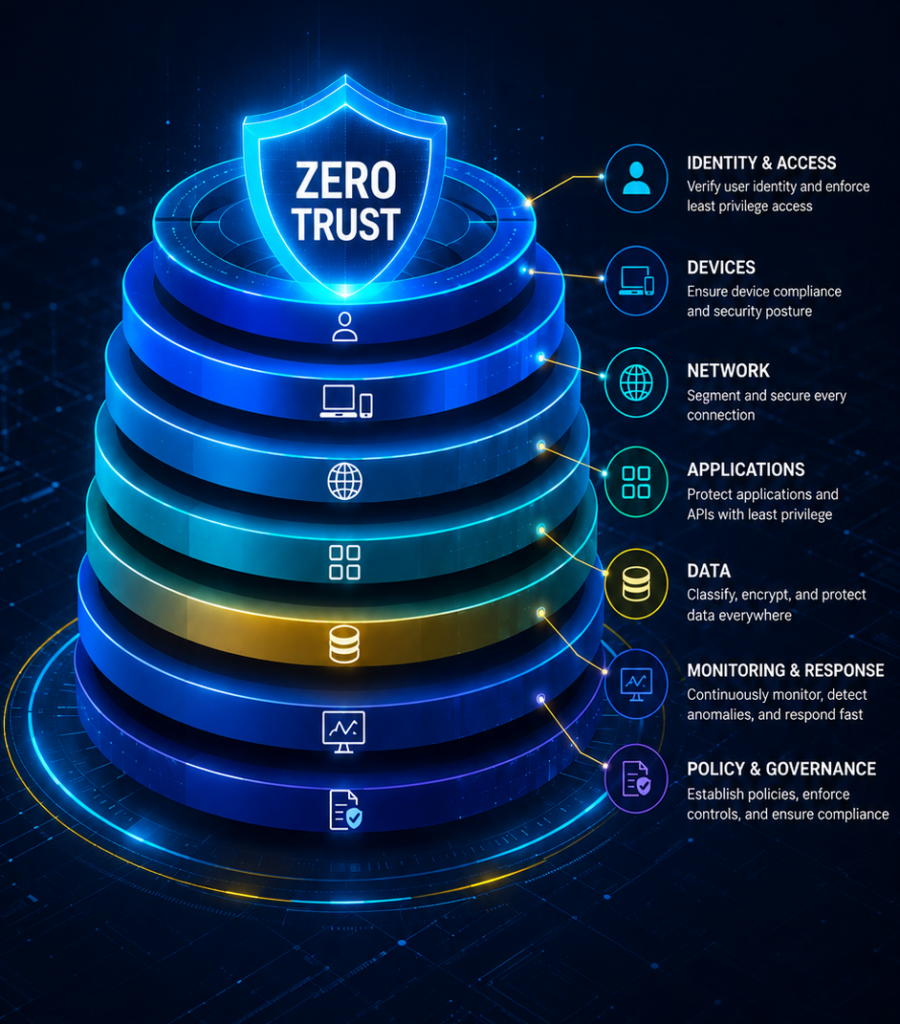
Zero Trust works by layering several security controls.
- The first layer is identity. Every user should have a unique account, strong authentication, and access based on their role. Shared logins and unnecessary admin rights create avoidable risk.
- The second layer is device security. A laptop, phone, or tablet should meet basic security standards before it connects to company systems. That may include updates, encryption, endpoint protection, and device monitoring.
- The third layer is access control. Employees should only access the systems and data they need to do their work. This is often called least privilege access.
- The fourth layer is visibility. Your organization needs to know who is accessing what, from where, and under what conditions. Without visibility, security becomes guesswork.
- The fifth layer is response. When something unusual happens, your systems and IT team need a way to act quickly.
Zero Trust is not one product; it is a framework for making better access decisions.
Does a Small Business Need Zero Trust?
For many small businesses, the answer is yes, but not all at once. A small business does not need to implement a large enterprise Zero Trust program on day one, but it should adopt the principles behind it. That means starting with practical security steps:
- Require multi-factor authentication
- Remove shared accounts
- Limit admin access
- Review user permissions regularly
- Secure employee devices
- Monitor account activity
- Document access policies
Zero Trust for small businesses should feel manageable. It should not create unnecessary complexity or slow the team down. When implemented thoughtfully, it helps protect systems while keeping day-to-day work moving.
What About Nonprofits?
Nonprofits often face the same security challenges as small businesses, with a few added layers.
Donor records, grant documents, board files, financial reports, and program data may be spread across multiple platforms. Staff, volunteers, and board members may need access from different locations and devices. Internal IT resources may be limited.
That makes access control especially important.
A nonprofit does not need to make every system difficult to use. It does need to know who has access to donor data, who can view financial records, and whether former staff or volunteers still have active accounts.
Zero Trust helps nonprofits protect trust. Not just network trust, but donor trust, client trust, and organizational credibility.
Which Zero Trust Network Is the Most Reliable?
This is a common question, but it can be the wrong starting point.
There is no single “most reliable” Zero Trust network for every organization. The right solution depends on your systems, users, budget, compliance needs, and existing tools.
For some organizations, the starting point may be Microsoft 365 security settings. For others, it may involve Google Workspace policies, endpoint protection, conditional access, VPN replacement, or Zero Trust Network Access tools. The more important question is: What are you trying to protect, and how does your team access it?
A reliable Zero Trust approach begins with understanding your environment. That means identifying critical systems, mapping user access, reviewing devices, and clarifying which data needs stronger protection. Tools matter, but strategy matters more.
A Practical Guide to Zero Trust Implementation
Zero Trust implementation should happen in phases. Trying to overhaul everything at once can create confusion and resistance. A steady approach works better.
1. Start with an access review
List your users, systems, and permissions. Identify who has access to what and whether that access still makes sense. Look closely at admin accounts, shared accounts, former employees, volunteers, vendors, and board members.
2. Enforce multi-factor authentication
Multi-factor authentication (MFA) is one of the most practical first steps. It strengthens account protection without requiring a full security overhaul. Start with email, cloud platforms, finance systems, HR tools, and administrator accounts.
3. Limit unnecessary access
Not everyone needs access to everything. Reduce permissions based on role and responsibility. This lowers the risk of one compromised account exposing too much.
4. Secure devices
Remote and hybrid work make device security more important. Require updates, endpoint protection, encryption, and screen locks where appropriate. For personal devices, define minimum standards before they can access business systems.
5. Add monitoring and response
Zero Trust depends on visibility. Your organization should be able to detect unusual logins, suspicious access patterns, and risky device behavior. Without monitoring, you may have policies on paper but little awareness in practice.
6. Document the framework
A Zero Trust approach should connect to your cybersecurity policy. Document access rules, device requirements, MFA expectations, offboarding procedures, and review cycles. This keeps expectations clear as your team and business grow.
Zero Trust Security Is a Direction, Not a Switch
One of the biggest misconceptions about Zero Trust is that it can be “installed.” It cannot.
Zero Trust is not a single tool, vendor, or network product. It is a way of managing access across users, devices, applications, and data.
That is why federal guidance, including CISA’s Zero Trust Maturity Model, treats Zero Trust as a maturity journey. Organizations move through stages as their identity, device, network, application, data, and monitoring practices improve.
For small businesses and nonprofits, this is good news. You do not need to do everything at once. You need to start with the controls that reduce the most risk.
When Zero Trust Becomes Bigger Than a Checklist, DeepTech Can Help
Early Zero Trust steps can be simple: turning on MFA, removing old accounts, limiting admin access, and reviewing permissions. But as your organization grows, the work becomes more layered.
You may have multiple cloud platforms, remote employees, personal devices, compliance requirements, cyber insurance questionnaires, and vendors with access to sensitive systems. At that point, Zero Trust becomes less about setup and more about governance.
DeepTech helps small businesses and nonprofits take a practical approach to Zero Trust security. We assess how your team works, identify access risks, and build controls that fit your environment instead of forcing a one-size-fits-all model.
The goal is not to make security feel heavier. It is to make access safer, clearer, and easier to manage.
If your team is ready to move from loose access practices to a more structured security model, DeepTech can help you build a Zero Trust approach that supports your growth without slowing your work.