Every day, business owners, staff, and nonprofit leaders get dozens of emails. Most of them are routine. Some are important. But among them can be fake or malicious messages designed to trick you. Learning how to tell if an email is fake is a fundamental part of good cybersecurity for any organization.
Scammers have become more sophisticated. They use familiar brands, familiar language, and urgent requests to make you act without thinking. If you misidentify a fake email as real, it can lead to credential theft, ransomware, financial loss, or compromised systems.
Fake Emails Are A Risk To Your Entire Business
Fake emails are one of the most common attack vectors in cybersecurity. According to the FBI’s Internet Crime Complaint Center, business email compromise and phishing remain among the top reported fraud types. These threats target all kinds of organizations, from small businesses to nonprofits and professional services.
Phishing emails often pretend to be legitimate services you use every day. Some common examples include:
- A supposed DocuSign email asking you to review a document.
- A “security alert” from PayPal claiming unusual activity on your account.
- A “shipment problem” notice from Amazon that tells you to click a link.
These messages feel official. They often use logos and familiar branding. But looks can be deceiving.
Signs To Spot A Fake Email
Recognizing a phishing or fake email isn’t as easy, since scammers have gotten really good at it, but there are simple ways you can tell if an email is fake. If you see one or more of these signs, treat the message with caution.
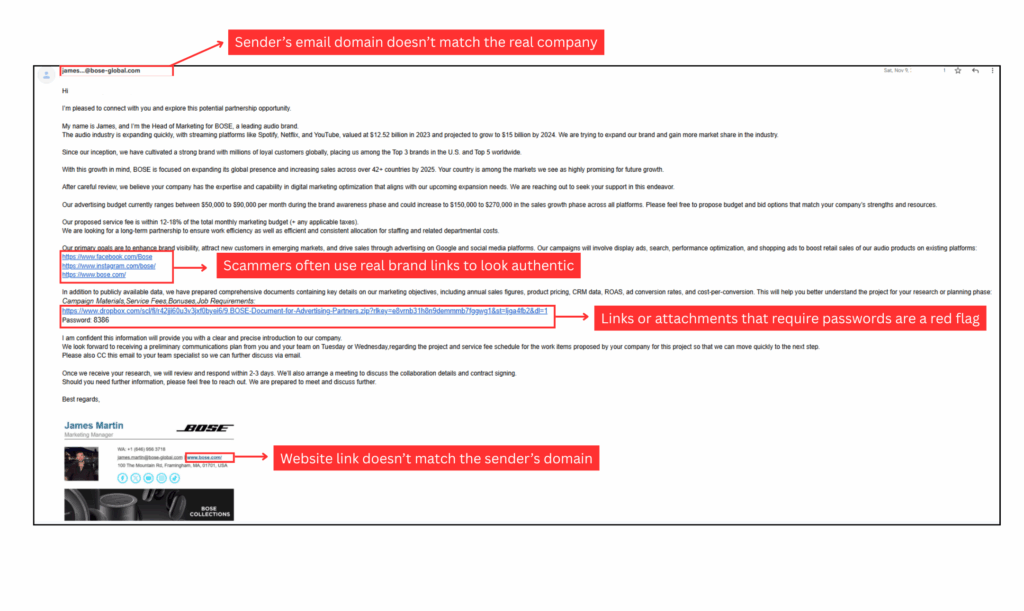
1. The Sender Address Doesn’t Match the Brand
A fake email might use words that look right but come from the wrong domain. For example:
- A PayPal alert from @paypaI.com instead of @paypal.com (the “L” in pal is actually a capital “i”)
- A DocuSign link sent from a free email address instead of docusign.net
Always hover your mouse over the sender’s address and check the domain carefully. Scammers often replace a single letter or use a similar domain to trick you.
2. There’s Urgent or Threatening Language
Fake emails often pressure you to act now:
- “Your account will be closed if you don’t verify here” (here has a link attached to it, which is a malicious one).”
- “Unusual login attempt detected — click now.”
- “You have an unpaid balance. Paid now”
Real companies rarely use hostile language or threaten without context. Be skeptical of urgent demands.
3. Poor Grammar or Spelling Mistakes
Legitimate business emails are generally proofread and professionally written. If an email contains many grammatical or spelling mistakes, that’s a strong signal that it might be fake.
4. Suspicious Links or Attachments
Fake emails usually want you to click something. Before you click:
- Hover over links to see where they actually point.
- Inspect attachments carefully, especially if they have unusual extensions like .exe, .scr, or .zip.
If a link does not clearly show the brand’s real domain name, don’t click it.
5. The Email Asks for Sensitive Information
Reputable companies don’t ask for passwords, Social Security numbers, or payment information directly by email. If someone is trying to get you to reply with sensitive data, it’s almost certainly a scam.
Think It Looks Legit? Look Again
Seeing real types of fake emails helps you know what to watch for.